01 / WATCH IT
Crunch broadcast
Crunch imports your source, creates an outline, and turns it into an animated broadcast with your current settings. No need to press Crunch or Broadcast.
Or use the full phrase
Broadcast in Gravitas Crunch
Don’t read. Watch.
Listen to articles, PDFs, and books with expressive on-device narration. Or watch your sources become a broadcast—with animated presenters, source imagery, and a style you choose.
ON-DEVICE AI. NO CRUNCH ACCOUNT. NO SUBSCRIPTION.
Try it free. $19.99 one-time unlock on the US App Store. Regional prices may vary.
Try it with SiriMind’s Eye update · October 15, 2026.


WATCH YOUR WORDS COME ALIVE
Mind’s Eye gives your sources a presenter. 18 characters across six styles bring together expressive voices, animated performances, layered sets, and source imagery. Choose a character or explore the cast with Shuffle.
Articles, documents, and EPUB books, read aloud with expressive local narration and a saved place.
Animated presenters and source imagery give your information a face as well as a voice.
Turn a research response into a presenter-led video. Replay it, save it, or share it.

ROBOT RADIO / CHOOSE THE SOURCES. PRESS PLAY.
You already know what interests you. Choose the publications you want to follow, press Play, and let Robot Radio turn their stories into a continuous lineup of short, presenter-led reports.
Channel surf curated stations across news, technology, science, culture, and more. Find fresh stories with Now, or build My Station around your own feeds.
Stay for the next report. Open the original article when something catches your attention. A program to turn on, not another reading queue.
Nothing to copy? Say “Hey Siri, Crunch radio.” Then choose a station and press Play.
YOUR WAY IN / SIRI & SHORTCUTS
Copy a link, an article passage, or a long AI response from another app. Choose what happens next. You can also open Crunch and use these features directly.
Then use one command below. On Mac, first create a named shortcut using Crunch’s actions in Shortcuts.
Crunch broadcast
Crunch imports your source, creates an outline, and turns it into an animated broadcast with your current settings. No need to press Crunch or Broadcast.
Broadcast in Gravitas Crunch
Crunch audiobook
Hear the full text of what you copied—not a summary. Crunch opens Audiobook Mode and starts playback when narration is ready. No extra tap on Play.
Play as an audiobook in Gravitas Crunch
Crunch clipboard
Open your copied link or text in the Reader. Read the original, ask questions, or choose how to experience it from there.
Open my clipboard in Gravitas Crunch
Just want the analysis? Say “Crunch it.” All Siri commands
THE FULL COMMAND REFERENCE
Say “Hey Siri,” then the command. Open your station, return to your book, or turn copied text into research.
Crunch it
OR SAY THE FULL PHRASE
Crunch it in Gravitas Crunch
Import your clipboard and start an analysis in Research Assistant. Ask questions and shape the explanation from there.
Crunch radio
OR SAY THE FULL PHRASE
Open Robot Radio in Gravitas Crunch
Open Robot Radio and your personal broadcast network. No clipboard input needed.
Crunch Technology
OR SAY THE FULL PHRASE
Open Technology in Gravitas Crunch
Replace Technology with a station name: News, Science, Now, or My Station. Say “Crunch” followed by the station name.
Crunch open audiobook
OR SAY THE FULL PHRASE
Open my audiobook in Gravitas Crunch
Open your last-played audiobook at its saved place, ready for Play. Already listening? Keep listening. This does not import your clipboard.
WHAT YOU JUST COPIED
“Crunch audiobook”Import the clipboard and start listening.
THE BOOK YOU WERE ALREADY READING
“Crunch open audiobook”Open your last-played audiobook at its saved place.
Copy the page’s URL and use any clipboard command above. For a Share Sheet or on-screen workflow, create a Shortcut that accepts URLs and Safari Web Pages, enables Show in Share Sheet and Receive What’s On Screen, and passes the page URL to the Crunch action you want to run.
FULL-TEXT LISTENING
Audiobook Mode reads the full text of articles, documents, and EPUB books with expressive narration generated on your device.
Return to your saved place or move between sections. Your own reading becomes your listening library.
Copy a link or text and say “Hey Siri, Crunch audiobook.” To open the book you were already listening to, say “Hey Siri, Crunch open audiobook.”
Stay with the article or book instead of turning it into a summary.
Return to the source and continue from where you left off.
Qwen generates speech locally. Bring your own reading; no Crunch audiobook subscription is required.
FOLLOW THE STORY INTO THE SOURCE
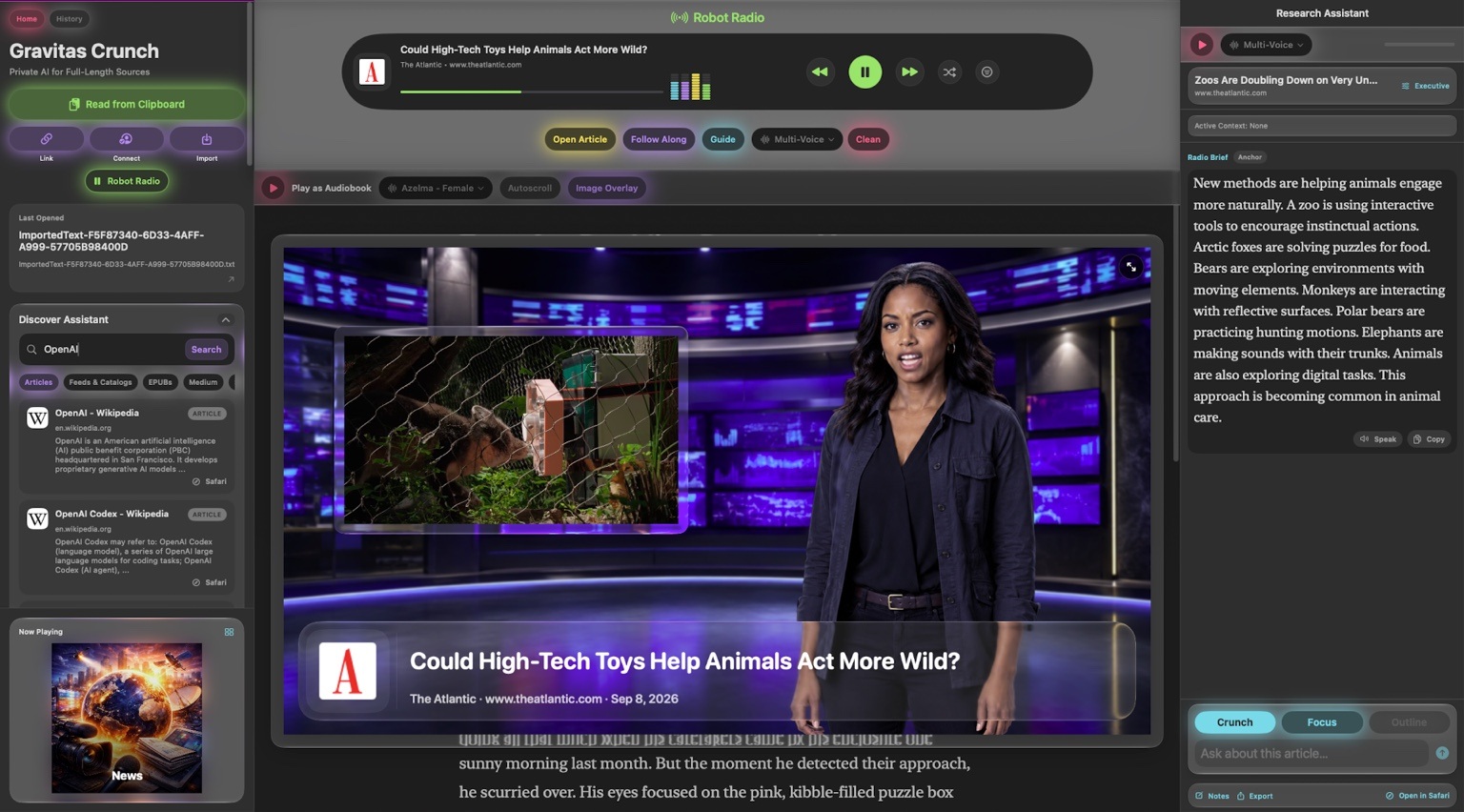
A quick report is only the beginning. Open the original, ask a question, and follow available citations back to supporting passages. Read, listen, watch, and research in the same workspace.
01 / EXECUTIVE
Main ideas and high-level takeaways, organized so you can get your bearings before going deeper.
02 / TECHNICAL
Methods, assumptions, and deeper explanations for the questions a quick recap leaves behind.
03 / STUDY GUIDE
Concepts, definitions, and a review-ready structure for spending more time with what you’re learning.
RESEARCH TO VIDEO
Start with an article, a paper, or an EPUB. Ask for a briefing, a study explanation, or a product introduction.
Make it shorter. Explain it simply. Change the tone, audience, or focus. Use conversation to shape the script before a presenter delivers it.
Keep the performance.
Leave the generation waits out of the video.
“Make this an executive briefing.”
“Now explain it for someone new to the topic.”
“Keep the point. Make it shorter.”
ARTICLES. BOOKS. FEEDS. RESEARCH.
Paste a link. Copy a passage. Import a document. Follow a publication. Crunch works with the material you already care about.
Find more through Discover Assistant, which prioritizes newer dated articles in topical searches. Save sources for offline reading, return through History, and export research as text, Markdown, PDF, or a broadcast video.
Articles · PDF · EPUB · Plain text · Markdown
RSS · Atom · Substack · Medium · WordPress · Ghost
Wikipedia · arXiv · PubMed · DOI-linked papers · LaTeX
Supported YouTube, Vimeo, Reddit, and podcast sources
Available text, imagery, media, and transcripts depend on the source. Source media remains attributed to its publisher.
Apple Intelligence handles summaries and research. Qwen generates speech locally. Mind’s Eye builds the animated presentation. No remote AI inference server is needed for that workflow.
No Crunch account. No Crunch subscription. Your library stays on your device.
Online discovery, source retrieval, and publisher media still use internet services. AI summaries, research, and narration currently support English and require compatible hardware with Apple Intelligence enabled.
A little more context
Choose a source to explore, or turn on a station. Here is what to expect.
Contact supportCreated by Rich Fallat, bringing a character artist’s eye to the way information is presented.
Read the making-ofOpen Robot Radio, choose a station, and press Play. Or copy a link or text and say “Hey Siri, Crunch broadcast” to watch an animated explanation, “Hey Siri, Crunch audiobook” to hear the full text, or “Hey Siri, Crunch clipboard” to open the source.
Full-text reading is part of Crunch. It also turns feeds into a continuous broadcast, presents explanations through animated characters, and lets you save selected research as presenter-led videos. You can move from a report to the source and deeper research.
Mind’s Eye is Crunch’s real-time procedural 2D animation system. It combines authored presenter artwork, lip sync, subtle motion, layered sets, source imagery, and broadcast graphics. The character artwork is prepared; each segment is assembled from the material being presented.
No. Siri and Shortcuts are convenient ways into the app. You can also open Crunch, choose a station, import a source, use Research Assistant, and press Broadcast directly. The full command reference above includes both short and long Siri phrases.
Mac requires a custom shortcut instead of the app’s built-in Siri phrases. In Shortcuts, create a shortcut named Crunch broadcast. Add Get Clipboard, then Crunch’s Broadcast in Crunch action with Content set to the Clipboard result. Copy a source and test the shortcut, then ask Siri to run it by name. Apple’s Mac platform guidance.
Robot Radio creates shorter, anchor-style reports from feeds and stations. Audiobook Mode reads the full source in navigable sections. Open the original when a report interests you, then choose whether to read, listen, or investigate.
Yes. Select a response or transcript in Research Assistant and use Broadcast to create a presenter-led video. Replay, save, or share the finished segment. Generation waits and user pauses do not become dead time in the export; the voice’s intended pauses remain.
Use conversation to request a different length, tone, focus, or audience, then select the response to broadcast. Choose a presenter from the available cast. A requested duration is a creative target; actual spoken length depends on the text and voice.
Available citations link to supporting passages, and the original source stays accessible. Executive, Technical, Study Guide, and Focus modes provide different ways to work with the material. Generated answers can contain mistakes; check important claims against the source.
Crunch does not require a Crunch account or subscription. Try it free, then unlock for $19.99 USD with a one-time in-app purchase. Regional prices may vary. Your library stays on your device. Some publishers may require their own sign-in or subscription to access their content.
Yes. Summaries and research use Apple’s on-device model, Qwen generates speech locally, and Mind’s Eye builds the animated presentation on your device. Online discovery, new source retrieval, and publisher media still require internet access. Siri availability and processing are separate from Crunch’s local AI workflow.
AI summaries, research responses, and narration currently support English. Mind’s Eye is built for iOS 27, with experiences across iPhone, iPad, Mac, and Apple Vision Pro. Apple Intelligence features require compatible hardware with Apple Intelligence enabled. Check the App Store listing for current requirements on each platform.
Sources differ in what they make accessible. A podcast may not publish a transcript, a video may have restrictions, or a page may lack usable images. Available text, imagery, and media depend on the publisher. For a problem report, include your device, system version, source URL, and what happened.